Summary and share a run
Easily view a summary and share run info as an image or a polished clip.
Summary & Share
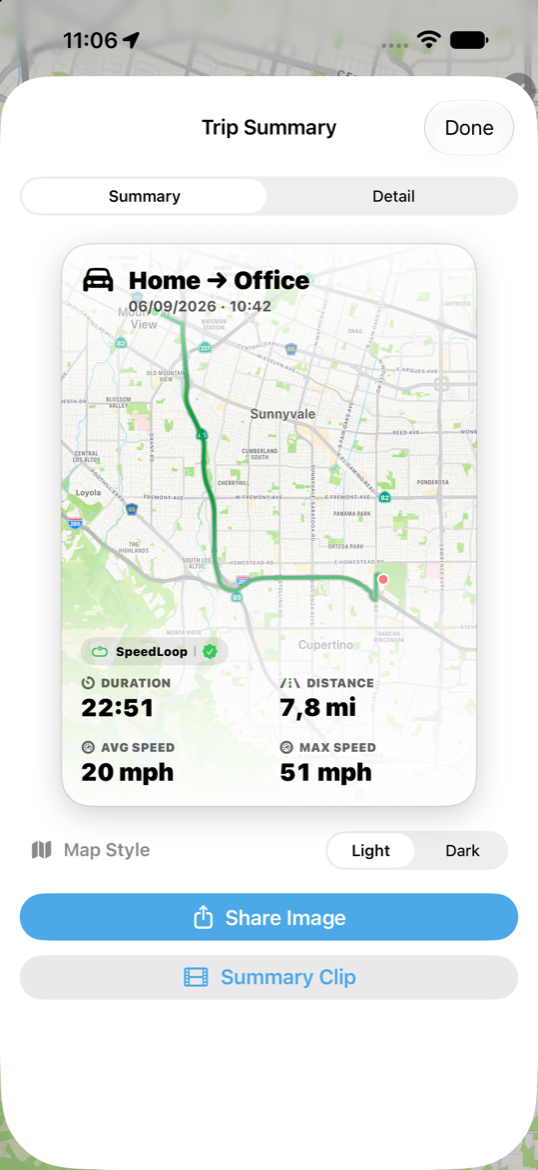
After you finish a recording session (or open a run in replay), Summary & Share opens the report: distance, time, speed, and personal-best context.
The summary image includes the map with info layers on top.
Route clip
From replay, open Clip for a polished ~15s video summary of the run:
- Play combines the route, map style, and car/plane model into one polished clip and plays it in 1:1 (square), 9:16 (portrait), or 16:9 (landscape).
- Export shares the clip (save to the photo library — permission required — or post to social platforms).
The car/plane model follows the route; flight routes can use altitude while the drawn path stays on the ground.
Share image and clip follow whether the replay path is set to smooth or raw.